


50+ Free Open-Source React Components
Ship new apps faster with our flexible and growing React components set, including 50+ free, open-source controls. Built on enterprise grade architecture and maintained by Infragistics. No commercial license required.
Why Ignite UI Open-Source Controls for React?
Ignite UI for React open-source controls remove the risk of relying on short-lived or demo-only libraries. You can skip months of design and development. Start crafting feature-packed apps for real-world scenarios using 50+ cohesive, MIT-licensed UI components, with full control over their look and behavior.

Open Development on GitHub
With public source code, issue tracking, and a transparent roadmap. It’s never been easier to inspect the implementation, follow progress, and contribute directly.

Performance-Focused
Optimized and maintained for performance by the Infragistics engineers. Ensuring efficient rendering, predictable behavior, and features for production-grade apps.

Accessibility-Ready
All of our open-source controls follow accessibility best practices, including keyboard navigation and support for assistive technologies.

Built for the Long Term
Delivering continuous maintenance and refinement to evolve alongside React and modern web standards. The focus is stability, reliability, and active development.
Featuring Open-Source Grid Lite
With essential data-display features and minimal overhead, giving developers the performance they expect without unnecessary complexity.


What’s Included: React Open-Source Components
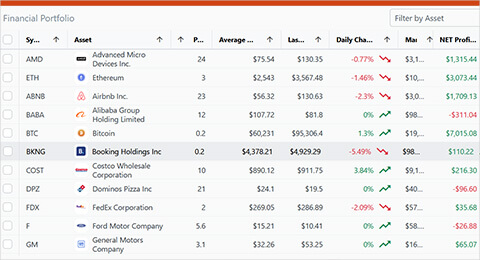
This is a growing collection of reusable React UI components. From basic inputs and navigation to layout and data-focused components – all available as open source, enabling you to see how things work under the hood. Lightweight, responsive, and customizable. Without package dependencies to manage and no vendor lock-in.



Ignite UI React Open Source Fitting in the Bigger Picture
Ignite UI for React open-source components are part of our larger React ecosystem, but they remain fully capable and feature-packed on their own: Grid Lite, Chat, Tile Manager, Date Picker, Calendar, Time Picker, and many more.
| Library | Controls | Data Grid / Table | Primary Focus | Support & Samples | Upgrade Path | Performance | Theming |
|---|---|---|---|---|---|---|---|
| Ignite UI for React (Open-Source) |
50+ | Grid Lite | High-performance React UI components | Community + Infragistics docs and demos | Seamless upgrade to Premium | Designed for performance and large data sets | Powerful theming engine with built-in themes + CSS customization |
| MUI (Material UI) |
50+ | Grid | Material Design UI for React | Community + extensive docs and examples | Paid MUI X for advanced grids and components | Optimized for typical React apps | Powerful theming system (ThemeProvider, CSS vars) |
| Ant Design (AntD) |
60+ | Grid | Enterprise-style design system for React | Community + comprehensive docs and demos | No separate advanced commercial tier | Good for enterprise apps; table supports pagination/virtualization | Built-in theming with LESS/CSS variables |
| KendoReact (Free Tier) |
50+ | Limited Data Grid | Enterprise React UI components | Community docs and samples | Upgrade to full KendoReact suite | Strong focus on performance (full version) | Built-in CSS themes |
| Chakra UI | 80+ | Grid & Table | Accessible, composable React UI primitives | Community + docs and examples | None | Lightweight and performant for UI composition | Theme-first design, strong customization |
| Radix UI | 20+ | Basic Grid | Unstyled, accessible UI primitives | Community + docs and examples | None | Very lightweight; minimal runtime overhead | Unstyled by default; full control via CSS |
| React Bootstrap | 20+ | Tables | Bootstrap-based React components | Community + docs and examples | None | Lightweight; depends on Bootstrap CSS | Bootstrap theming via CSS/SASS |
What People are Saying About Our Products








 5/5
5/5You get a comprehensive set of UI components that are well-built, consistent, and reliable for real-world applications. The one thing I like the most is the performance of data heavy components like data grids and charts. You rarely get that in other component libraries or at least not on the same level. I really like the new set of open source components for Angular and React. They’re ideal for smaller projects and applications, allowing teams to build without adding extra licensing costs.
 5/5
5/5We’ve been using Ignite UI for Angular for close to five years, primarily for the grid and its advanced features. The grid is powerful, flexible, and well suited for data-heavy scenarios. I also appreciate the recent move to release more components as open source, which makes the library more accessible, transparent, and easier to adopt across teams and projects./p>
5/5The grid is very powerful: fast rendering, excellent filtering, sorting, grouping, and looks clean out of the box. Myteam really appreciates how feature-rich it is.
5/5The Grid handles huge datasets with smooth scrolling and includes features like filtering, grouping, inline editing, and Excel export right out of the box.
5/5The drag-and-drop components speed up UI creation dramatically, while the generated code is clean and portable. I can easily switch frameworks. Also, I love that there’s no vendor lock-in.
5/5During our research we found Reveal and they promised fast deployment, extreme security measures, and significantly lower price tag. It turned out they were right. It took about a month to deploy and the cost saving was astronomical.
5/5The reusable components are framework-agnostic, which means I can design once and use them across Angular, React, Blazor or Web Components. This makes our development stack more flexible, especially when projects have different requirements.
5/5The Pivot Grid is brilliant. I just drop it onto the canvas, bind it to a data source, and App Builder automatically creates a pivot view for me.
5/5The library of over 65 reusable UI controls and prebuilt themes means you spend less time styling and more time designing flows and interactions. Built-in data binding, Master-Detail views and GitHub integration make it robust as well
Frequently Asked Questions
What are free and open-source React components?
Free and open-source React components are reusable UI building blocks built for React apps that are released under a MIT license. Using them, you can build UIs faster, customize behavior, and inspect or contribute to the source code without having to purchase a license.
Are Ignite UI React components really free and open-source?
Yes. Infragistics has released a growing set of Ignite UI React components as fully free and open-source. All of them are publicly available, maintained in open repositories, and can be used without a commercial license.
What types of free React components are included?
The Ignite UI React open-source components set offers a variety of controls, including form inputs, navigation components, layout elements, feedback components, and utility UI elements designed for modern and scalable React apps.
Can I use these React open-source components in production?
Yes. There are no royalties, user limit, or hidden costs that may follow. They are suitable for real-world use in SaaS products, internal tools, dashboards, etc. Nothing will prevent you from deploying your app.
How do these React components compare to other free React libraries?
Unlike MUI, Ignite UI OSS components are maintained by a dedicated engineering team with enterprise support available on upgrade.
Ignite UI focuses on long-term maintenance, consistency, and production use. Choosing it means choosing a library that won’t get abandoned over time.
Are the React open-source components actively maintained?
Yes. The components are actively maintained by the Infragistics engineers, with updates, bug fixes, and issue tracking handled openly through GitHub. Community contributions are encouraged as part of the open-source process.
Can I customize or extend these React OSS components?
Absolutely. Because the components are open-source, developers can customize styles, extend functionality, or modify behavior to meet specific project needs while still benefiting from future updates.
Do I need to pay or register to use the free React components?
No. These are absolutely free React open-source components which do not require payment, registration, or a commercial license. Developers can access the source code, documentation, and examples directly.
How do Ignite UI React open-source components fit with the full Ignite UI React library?
These are components from the same library. The Premium controls are not published under the MIT license. If an app grows in complexity and demands more advanced functionalities, users can easily transition to the Premium controls.
Where can I find documentation and examples for the React components?
Documentation, API references, and usage examples are available alongside the React open-source components. Using these resources will help you quickly examine and integrate the components into your React projects.
Ready to Get Started?
Join thousands of developers building amazing React applications with Ignite UI Open-Source components.